
Salesforce Maps alternative
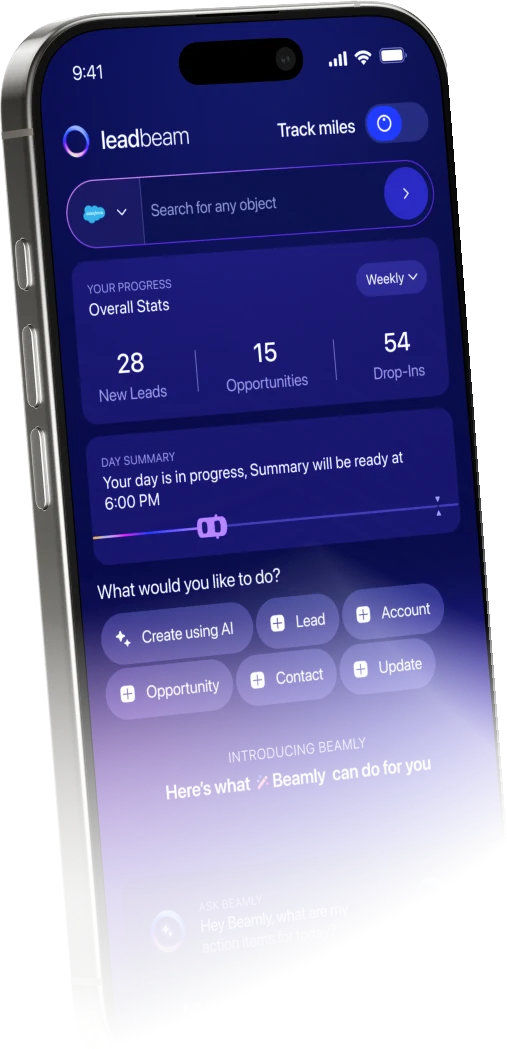
Leadbeam scores 30M+ businesses so reps know where to go and what to say, and captures what was said using voice AI in under 30 seconds. SumUp’s reps saved 5+ hours each week.

Trusted by field teams at


LEADBEAM VS SALESFORCE MAPS
Salesforce Maps is now a mapping feature inside Salesforce for routes, schedules and territory planning. Since August 31, 2026, field reps reach it through the Maps Mobile tab in the Salesforce Mobile App, where every feature except Live Tracking has carried over. Leadbeam does everything the map does and goes beyond it, finding scored prospects, briefing reps before each stop and logging visits by voice, proven to find your team’s revenue.
Choose Salesforce Maps if
Choose Leadbeam if

The difference
FIND
ATLAS
SALESFORCE MAPS
Ranks records already in Salesforce by Einstein score, revenue or last visit. Outside data has to be imported first.
LEADBEAM
Atlas maps 30M+ businesses, enriched and scored on 30+ signals. Gaps in a territory show up as prospects, not empty space.
CAPTURE
PULSE
SALESFORCE MAPS
Reps capture field notes and check in from the Maps tab. No voice-to-record or photo capture is listed.
LEADBEAM
A voice note on the walk back to the car becomes the visit log, contacts and next step in Salesforce, so managers see every visit the moment the rep confirms.
AI-Assistant
Beamly
SALESFORCE MAPS
Maps helps reps prep with customized meeting checklists. AI assistance sits in Salesforce’s wider Agentforce platform, not in Maps.
LEADBEAM
Beamly works directly on your CRM, including custom objects and fields. It can do analysis for both the rep and leaders with natural language, prep you for meetings and do any CRM action.
Side by side
Salesforce Maps helps the office plan territories, schedules and lead assignment. Leadbeam turns that plan into results on the road, scoring every stop, briefing the rep and capturing each visit as it happens.


WHO WINS
FINDING & PREPARING
What the AI works from
Your Salesforce data and Einstein scores, plus any third-party data layers you import
Your CRM, plus 30M+ mapped businesses and live research.

Finding new businesses
Third-party business, property and demographic layers imported through data connectors; suggested options fill open calendar windows
Atlas. 30M+ businesses already enriched and scored, with owner, tech stack, hours and local competitors
Prospect scoring
Prioritizes records already in Salesforce by Einstein score, potential revenue or last visit; businesses outside it aren’t scored
Atlas. Scores every business before it reaches your CRM: intent, tech fit, territory context and your closed-deal patterns. Shows businesses before they open.
Visit prep
Step-by-step visit checklists set by the company; no account briefing or outside research
Beamly. Build custom reports, log any actions, and build battle cards per prospect from CRM history, company knowledge and live web research, including every promise made on past visits
IN THE FIELD
Field capture
Check-ins and typed notes in the Maps tab; no voice-to-record or photo capture listed
Pulse. Voice, photos and text from one visit become connected accounts, contacts and tasks, mapped to your CRM’s custom objects and required fields; the rep reviews before anything syncs
Routing
Automated routes and schedules that cut drive time and fill last-minute gaps with nearby accounts
Compass. Sequenced by revenue priority, fixed meetings, business hours and live traffic. Updates dynamically as your plan changes.
Even
Multi-week scheduling
Maps Advanced plans visit schedules up to a quarter ahead, with priority scheduling and advanced business logic
Compass plans each day and re-sequences it as meetings move or stops close
Lead assignment
Auto-assigns new leads to reps based on location
Territories by rep and region; lead assignment rules stay in your CRM
Even
Mileage
Live Tracking retired on August 31, 2026; Salesforce now points teams to Check-In and Mileage Administration inside core Maps
Recorded along the route actually driven, ready for reimbursement
Follow-ups
No follow-up drafting listed; reps write and log each one themselves
AI-drafted follow-ups and tasks after every visit
Mobile app
Runs as the Maps Mobile tab inside the Salesforce Mobile App; the standalone Maps app retired on August 31, 2026
Native iOS and Android
MANAGERS & PLATFORM
Coaching
Check-in history and Salesforce reports; managers decide what to coach from there
Studio. Flags missed follow-ups, stalled deals and stages that contradict the field conversation. Ability to customize dashboards & reporting.
Territory potential
Thematic maps and geo-analytics on your Salesforce data in Maps Advanced; potential outside your records depends on the data you import
Atlas + Studio. Potential beyond your CRM, including high-fit areas with no assigned rep
Territory planning
Territory Planning draws contiguous territories balanced on any numeric attribute, such as revenue, workload or account count
Territories by rep and region, redrawn visually in Studio
CRM
Salesforce only: an add-on for Professional, Enterprise, Unlimited and Performance editions
Native to Salesforce, HubSpot, Zoho, Pipedrive, Dynamics 365 and SAP, or runs as Leadbeam CRM, with custom objects and required fields
Security
Covered by Salesforce’s compliance program, including ISO/IEC 27001 and SOC 2
ISO/IEC 27001:2022, SOC 2 Type II, GDPR, AES-256 and TLS 1.3, role-based access, audit logs
Even
Pricing
$75 per user a month, or from $125 for Maps Advanced, billed annually, on top of a Sales Cloud license
Published per rep: Starter $59, Pro $149 a month, billed annually; Enterprise quoted
Verified against Salesforce’s own pages on November 12, 2026. Sources:

Proof
Every number here comes from a published Leadbeam customer story, linked to the source.
“
Leadbeam has been an incredibly useful tool for our sales organization. It has helped our field sales team become more efficient and provided valuable insights.Read the SumUp story
#1 Momentum Leader, G2 Spring 2026 · Best Usability and Best Results, G2 Winter 2026 · Case studies:
SumUpFlipdishClassPassFloral ImageB+M IndustrialWhy Leadbeam Wins
Leadbeam has groundbreaking adoption. 90%+ of your reps will love it.
DESIGNDESIGN
A brief before every door
30 seconds
Voice note to CRM records
Under 30 seconds
G2 · Winter 2026
Best Usability
Of reps USE US daily
70%
POWERPOWER
Businesses scored by Atlas
30 million+
Scored against
Your closed deals
Products in one app
Six
Security
ISO 27001 · SOC 2
People use what they love. We built Leadbeam the same way.

Leadbeam saves time only when reps use it. When they do, Pulse logs the CRM entry and Compass plans the route, so the time saved goes back to selling. Enter your team size and how long a visit takes, including drive time.
That is the selling time of 5 full-time reps, without a new hire.
Hours saved assume 5 hours per rep per week, as reported by SumUp, over 48 working weeks. Revenue uses your win rate and average account value. Your team’s results will vary.
Book a Demo
Built for your industry
Every rollout is led by Leadbeam’s AI engineers, not a support queue. They configure scoring, revenue-based routing, briefs, capture and CRM field mapping.
01
POS & payments
02
Medical devices & pharma
03
Alcohol & CPG
04
Industrial
05
Conferences & events
POS & PAYMENTS
ATLAS
Merchants scored on their current tech stack, business hours and the traits of merchants you’ve already signed.
BEAMLY
The current setup, the likely contract objection and what the last rep promised.
PULSE
A photo of the counter and a voice note become the merchant, every contact and the follow-up, in your CRM.
MEDICAL DEVICES & PHARMA
ATLAS
Practices and clinics scored for fit, so scarce visits go to the accounts most likely to buy.
BEAMLY
A pre-call brief on the practice, past discussions and every open commitment.
PULSE
Visit notes structured into your CRM’s account and provider objects, with required fields enforced and every record approved by the rep.
ALCOHOL & CPG
ATLAS
On- and off-premise accounts scored for fit, including the ones missing from your current list.
COMPASS
Routes built around opening hours, fixed appointments, live traffic and the accounts worth the stop.
PULSE
Shelf and menu photos plus a voice note become a structured visit record.
INDUSTRIAL
ATLAS
Contractors, facilities and distributors across the territory, scored against the accounts you already win.
BEAMLY
Account history across long cycles, so a new rep picks up exactly where the last one left off.
PULSE
One site visit with three people becomes the account, three linked contacts and clear next steps.
CONFERENCES & EVENTS
BEAMLY
A brief before every booth meeting and scheduled session.
PULSE
Business cards, badge photos and booth conversations become leads and follow-ups by voice or photo.
COMPASS
The days around the event, planned: venue meetings plus nearby accounts worth a visit.
Configured to your CRM
Objects, required fields and workflows mapped before your reps log in.

Tuned to your wins
Atlas scoring calibrated to the deals your team has already closed.

Live on your accounts
See it working on your own territory by the second call.
Before you switch
Bring them to a 20-minute first call. We’ll answer on your own accounts.
What happened to the Salesforce Maps mobile app?


Salesforce retired the standalone app on August 31, 2026 and moved Maps into the Maps Mobile tab of the Salesforce Mobile App. Salesforce says every feature carried over except Live Tracking, which ended that same day; teams use the included Check-In and Mileage Administration instead.
How is Leadbeam different from Salesforce Maps?
Salesforce Maps plans where reps go. Leadbeam runs the visit too: Atlas scores businesses outside Salesforce, Compass orders the day by revenue, Beamly briefs the rep, Pulse logs the visit and Studio shows managers where deals stall.
Salesforce Maps already uses Einstein scores. What’s different?
Einstein scores rank records already in your org. Atlas scores 30M+ businesses on 30+ signals before anyone logs them, so reps find accounts Salesforce has never seen.
Can we keep Territory Planning?
Yes. Territory Planning is a Salesforce Maps strength. Leadbeam runs on the same Salesforce org, so ops keeps planning territories while reps get scoring, routing, briefings and capture in the field.
Do we have to leave Salesforce?
No. Leadbeam sits on top of Salesforce, mapped to your custom objects and required fields. No migration. No switching. It also works with HubSpot, Zoho, Pipedrive, Dynamics 365 and SAP.
How do we move a team off Salesforce Maps?
Start one field team on Leadbeam and keep the rest on Salesforce Maps. Compare visits, logged activity and pipeline after a few weeks, then roll out before your Maps renewal. Salesforce stays the system of record.
How does Leadbeam handle mileage now Live Tracking is gone?
Leadbeam records mileage along the route the rep actually drove, ready for reimbursement, in the same app as routing and capture.
Does Pulse update Salesforce without the rep checking?
No. Pulse drafts every contact, field and relationship. The rep reviews them before anything is written to Salesforce.
What if reps lose signal between stops?
Pulse keeps capturing offline and syncs to Salesforce when the signal returns.
How does Salesforce Maps pricing compare?
Salesforce Maps lists at $75 per user a month, or from $125 for Maps Advanced, billed annually, and every rep also needs a Sales Cloud license. Leadbeam starts at $59 per rep a month billed annually ($89 monthly), AI included. Pro is $149 billed annually; Enterprise is quoted.
Tomorrow · 07:40
Tomorrow at 7:40, your reps could already know which door comes first. Keep your CRM, or upgrade to Leadbeam CRM.
20-minute first call · ISO 27001 · SOC 2 Type II · 4.9 on G2 from 89 reviews


